Maybe you’re curious. Maybe you’re budgeting. Or, maybe you just got an alert that said your teenager just used 90% of your monthly data on the first day of your billing cycle! What on earth is using your data?!?!? Great question and it may not always be what you think.
Take a breath…it was probably bound to happen.
It seems the more smartphones advance, the more they’ve come to rely on the abundance of today’s networks. It is data after all that helps apps and services produce robust experiences like pushing real-time content. Be it news, weather, communication or extra levels in a video game, data helps make a lot of current apps tick.
Where Can I Find What’s Using My Mobile Data?
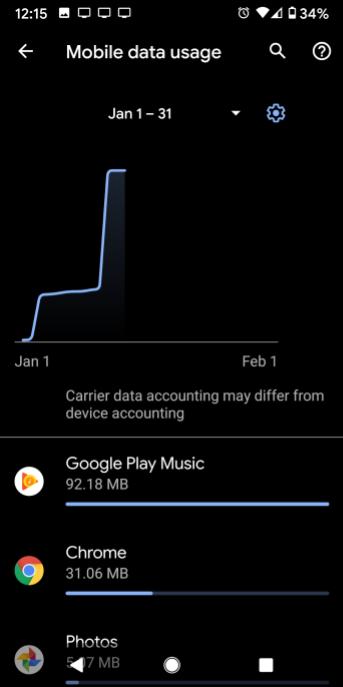
Even if you’re on an unlimited plan, it may be worth it to find out how much data your apps are using and what may be using data when you’re not looking. Check out the below steps for popular devices.
Pixel and some others – Settings > Network and Internet > Mobile Network > App Data Usage
Samsung – Settings > Connections > Data Usage > Mobile Data Usage
iPhone/iOS – Settings > Cellular or Settings > Mobile Data. For iPad, you may see Settings > Cellular Data instead.
Foreground vs. Background
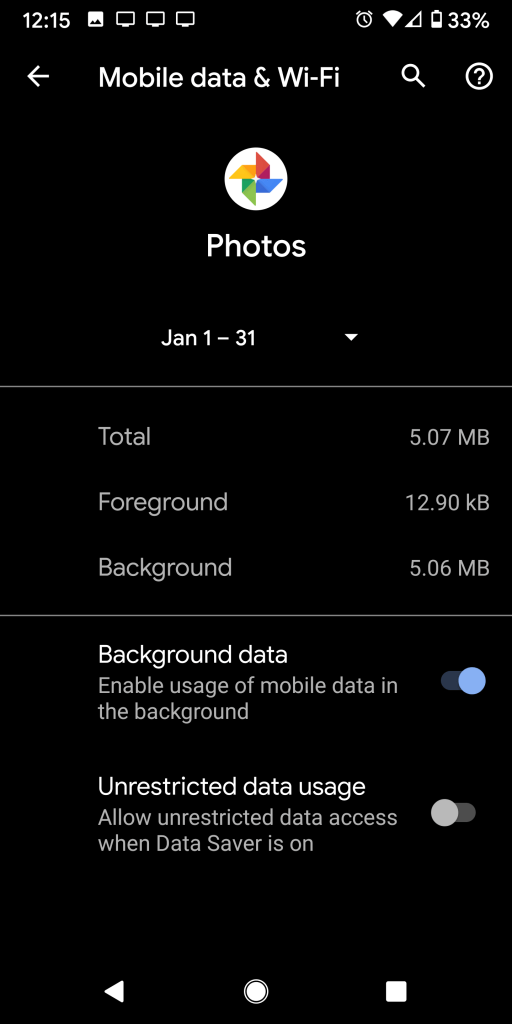
Some devices will help you distinguish exactly when an app is using data. Foreground and Background information found within the settings above will tell you how much data is being used when you’re actively using the app and how much is being used when you’re not interacting with the app respectively. Bear in mind, background data can be important for apps that need to run important processes like backing up your data, photos, or pinging networks for new alerts and updates.
What Can I Do to Stop This Madness?
Hoooooold your horses just a sec. I know that seeing an impending charge can make you want to shut the whole device down or start limiting services and they may end up being the right thing to do at the moment. Within these data sections of your device you can turn off specific app data access or mobile data entirely. However, this may cause more problems in the long run for the apps you enjoy and/or rely on. Turning off data for important apps like email might mean that you miss the important security advisement your bank is trying to alert you of.
 Tech Dabble